miércoles, 18 de agosto de 2021

Solving locking problems with monolithically increase identifiers

We usually observe locking problems in applications that use monolithically increase identifiers for their application components, where multiple sessions are trying to obtain the next identifier, in all this situations it´s highly recommendable to use "sequences" from the database side, that will allow less locking problems within the databases:


With locking problems:


update serials set lastvalue=lastvalue+1 where type='invoice' returning lastvalue into vlastval;

Insert into invoices (id, …) values (vlastval, …);


For a single session, the "update serials" command will create an exclusive row lock in the row with "type='invoice'". When you have multiple sessions trying to obtain the next identifier, each session that obtains the lock will block all other sessions trying to obtain the same lock, so a locking contention appears at the database server level. Your database server "precious" time is wasting only waiting for locks to be released …, just not doing anything good for the business.


Without locking problems:


Insert into invoices (id, …) values (nextval('seq_invoice_serial'), …);


Here we obtain the next identifier by using the sequence "seq_invoice_serial", that will not generate the locks/blocks observed before.


The problem arrives when application logic is not using a standard number for those identifiers, so "sequences" approach seams to not work properly, by example, imagine an application component (billing) that create their billing identifiers by this formula:


"AYYYYMMS9999999", where:

  • A=Fixed character
  • YYYY=Year
  • MM=Month
  • S=Fixed character
  • 9999999=Sequential number reset to 1 on each new Month


So, we could have this identifiers:

A202010S0001234, A202010S0001235, A202011S0000001, A202011S0000001, …


This special identifiers doesn´t match exactly with the database "sequences" approach. With sequences we can control the increment (increment by 1,2…), the minvalue, the maxvalue, if cycling values, but we can´t have a sequential string or reset based in a timeframe, here you have the sequence create command:


CREATE SEQUENCE [ IF NOT EXISTS ] sequence_name [ AS { SMALLINT | INT | BIGINT } ] [ INCREMENT [ BY ] increment ] [ MINVALUE minvalue | NO MINVALUE ] [ MAXVALUE maxvalue | NO MAXVALUE ] [ START [ WITH ] start ] [ CACHE cache ] [ [ NO ] CYCLE ] [ OWNED BY { table_name.column_name | NONE } ]


In the following example we will illustrate and measure how could we remove locking problems in this scenario by still using the "sequence" approach.


Original billing sequential numbering

Here we´ll show a generic billing sequential number process:


Test datamodel


create table serials (type varchar(100), sequence bigint, yearmonth varchar(6), lastvalue varchar(20));

create index serials_01_I on serials(type);

insert into serials values ('invoice',0,'','');

create table invoices (code varchar(20), fx_datetime timestamp);


Function to get next identifier


create function get_next_invoice()
returns varchar as $$
declare
	vlastval varchar:='';
begin
update serials set
	sequence=(case when to_char(now(),'YYYYMM')=yearmonth then sequence+1 
							else 1
			 end),
	yearmonth=(case when to_char(now(),'YYYYMM')=yearmonth then yearmonth
							else to_char(now(),'YYYYMM')
			  end),
	lastvalue=(case when to_char(now(),'YYYYMM')=yearmonth then 'A'||to_char(now(),'YYYYMM')||LPAD((sequence+1)::varchar,7,'0') 
							else 'A'||to_char(now(),'YYYYMM')||'0000001'
			 end)
where type='invoice'			  
returning lastvalue into vlastval;
return vlastval;
end;
$$ language plpgsql;


Here we use the serials table to update always the same row (to guarantee uniqueness and atomically increase identifiers), checking if we are in a new month, we set the sequence to 1 and generating the lastvalue as a string as the application request "AYYYYMMS9999999"

Example function usage


insert into invoices select get_next_invoice(), current_timestamp;


Benchmark

To create a benchmark, we will create a file: "get_invoice.sql" with the only command:

insert into invoices select get_next_invoice(), current_timestamp;


And will execute the pgbench command (https://www.postgresql.org/docs/10/pgbench.html:(

pgbench -h <servername>.postgres.database.azure.com -p 5432 -U frpardil@<servername> --protocol=prepared  -P 1 --time=20 --client=30 -r --jobs=6 test1 -f get_invoice.sql

  • -r => to show per statement latencies
  • -P 1 => to show metrics each 1 second
  • --time=20 => 20 seconds of test
  • --client=30 => 30 different sessions
  • --jobs=6 => 6 jobs managing the client sessions


Test server is an Azure Database for PostgreSQL server, Tier: General Purpose, version:10, 4vCores, public IP access, (https://docs.microsoft.com/en-us/azure/postgresql/concepts-pricing-tiers)


pgbench -h <servername>.postgres.database.azure.com -p 5432 -U frpardil@<servername> --protocol=prepared  -P 1 --time=20 --client=30 -r --jobs=6 test1 -f get_invoice.sql
starting vacuum...ERROR:  relation "pgbench_branches" does not exist
(ignoring this error and continuing anyway)
ERROR:  relation "pgbench_tellers" does not exist
(ignoring this error and continuing anyway)
ERROR:  relation "pgbench_history" does not exist
(ignoring this error and continuing anyway)
end.
progress: 3.1 s, 29.8 tps, lat 75.596 ms stddev 44.555
progress: 4.0 s, 345.6 tps, lat 86.734 ms stddev 44.257
progress: 5.0 s, 284.0 tps, lat 106.031 ms stddev 74.786
progress: 6.0 s, 321.0 tps, lat 90.318 ms stddev 64.367
progress: 7.0 s, 265.0 tps, lat 117.689 ms stddev 137.011
progress: 8.0 s, 308.0 tps, lat 96.085 ms stddev 63.510
progress: 9.0 s, 247.0 tps, lat 117.740 ms stddev 130.024
progress: 10.0 s, 331.0 tps, lat 91.790 ms stddev 104.197
progress: 11.0 s, 276.0 tps, lat 108.908 ms stddev 121.539
progress: 12.0 s, 269.0 tps, lat 109.838 ms stddev 107.313
progress: 13.0 s, 303.0 tps, lat 99.651 ms stddev 84.757
progress: 14.0 s, 300.0 tps, lat 93.716 ms stddev 77.808
progress: 15.0 s, 295.0 tps, lat 106.247 ms stddev 136.072
progress: 16.0 s, 305.0 tps, lat 94.900 ms stddev 88.672
progress: 17.0 s, 272.0 tps, lat 108.254 ms stddev 103.558
progress: 18.0 s, 224.0 tps, lat 141.480 ms stddev 262.932
progress: 19.0 s, 293.0 tps, lat 106.081 ms stddev 131.669
progress: 20.0 s, 292.0 tps, lat 96.766 ms stddev 87.897
transaction type: get_invoice.sql
scaling factor: 1
query mode: prepared
number of clients: 30
number of threads: 6
duration: 20 s
number of transactions actually processed: 5032
latency average = 103.273 ms
latency stddev = 115.041 ms
tps = 245.795076 (including connections establishing)
tps = 252.400446 (excluding connections establishing)
statement latencies in milliseconds:
       103.440  insert into invoices select get_next_invoice(), current_timestamp;


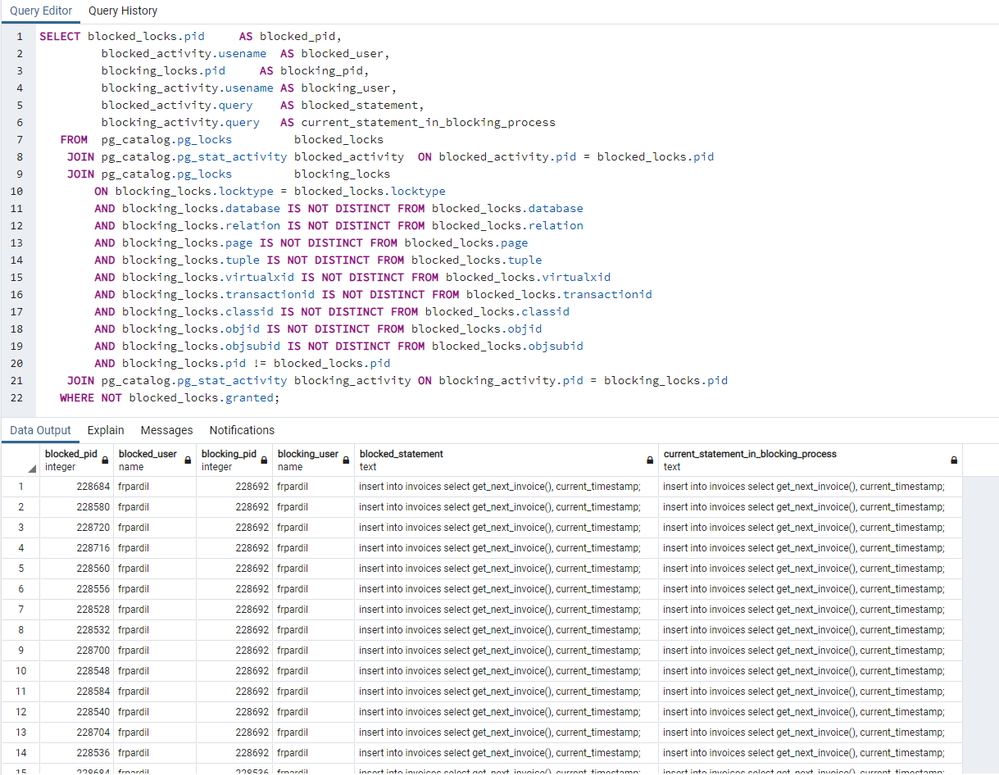
Locks when pgbench is executing

(from https://wiki.postgresql.org/wiki/Lock_Monitoring)
 

test1.png


We observe multiple blocked sessions during all the test execution.


In the test results, we see up to 252 Transactions Per Second (tps), a total of 5032 executions, so, in 20 seconds we correctly registered 5032 invoices.


Improved atomic billing sequential numbering

Now, we are going to generate a similar optimized function to improve these numbers and remove locks:


Create sequence


CREATE SEQUENCE IF NOT EXISTS seq_invoice_serial AS BIGINT INCREMENT BY 1 MINVALUE 1 NO MAXVALUE START WITH 1 NO CYCLE OWNED BY NONE;


Function to get next identifier


create or replace function get_next_invoice_improved()
returns varchar as $$
declare
	vlastval varchar;
begin
update serials set	
	yearmonth=to_char(now(),'YYYYMM'),
	sequence=(select setval('seq_invoice_serial', 1)),
	lastvalue='A'||to_char(now(),'YYYYMM')||'0000001'
where type='invoice' and yearmonth<>to_char(now(),'YYYYMM')
returning lastvalue into vlastval;
if vlastval is null then
	select  'A'||to_char(now(),'YYYYMM')||LPAD((nextval('seq_invoice_serial'))::varchar,7,'0') into vlastval;
end if;
return vlastval;
end;
$$ language plpgsql;


Here we use the serials table to update the same row, only when we are in a different month that the already saved, so, only 1 single update will take place every month, in this update we also reset the sequence "seq_invoice_serial" to 1, so we start again for each changed month, but will use the normal sequence to generate the application required format string with a simple select over the sequence: select 'A'||to_char(now(),'YYYYMM')||LPAD((nextval('seq_invoice_serial'))::varchar,7,'0') into vlastval;

Benchmark

To create a benchmark, we will create a file: "get_invoice_improved.sql" with the only command:

insert into invoices select get_next_invoice_improved(), current_timestamp;


In the same server, we execute the same pgbench command using the new get_invoice_improved.sql file:


pgbench -h <servername>.postgres.database.azure.com -p 5432 -U frpardil@<servername> --protocol=prepared  -P 1 --time=20 --client=30 -r --jobs=6 test1 -f get_invoice_improved.sql
progress: 3.5 s, 39.9 tps, lat 63.407 ms stddev 42.206
progress: 4.0 s, 633.8 tps, lat 48.170 ms stddev 13.816
progress: 5.0 s, 589.9 tps, lat 50.579 ms stddev 12.461
progress: 6.0 s, 638.1 tps, lat 47.403 ms stddev 2.199
progress: 7.0 s, 649.0 tps, lat 46.602 ms stddev 1.840
progress: 8.0 s, 594.0 tps, lat 50.016 ms stddev 13.926
progress: 9.0 s, 617.0 tps, lat 48.574 ms stddev 4.460
progress: 10.0 s, 593.0 tps, lat 51.081 ms stddev 12.930
progress: 11.0 s, 635.0 tps, lat 46.966 ms stddev 1.955
progress: 12.0 s, 566.9 tps, lat 53.043 ms stddev 24.858
progress: 13.0 s, 574.1 tps, lat 52.268 ms stddev 16.469
progress: 14.0 s, 631.0 tps, lat 47.366 ms stddev 1.824
progress: 15.0 s, 549.0 tps, lat 54.685 ms stddev 29.363
progress: 16.0 s, 634.0 tps, lat 47.730 ms stddev 3.021
progress: 17.0 s, 619.0 tps, lat 48.068 ms stddev 2.890
progress: 18.0 s, 636.0 tps, lat 47.068 ms stddev 2.197
progress: 19.0 s, 596.0 tps, lat 50.293 ms stddev 12.967
progress: 20.0 s, 644.0 tps, lat 46.581 ms stddev 1.508
transaction type: get_invoice_improved.sql
scaling factor: 1
query mode: prepared
number of clients: 30
number of threads: 6
duration: 20 s
number of transactions actually processed: 10260
latency average = 49.356 ms
latency stddev = 13.588 ms
tps = 507.757804 (including connections establishing)
tps = 523.664725 (excluding connections establishing)
statement latencies in milliseconds:
        49.840  insert into invoices select get_next_invoice_improved(), current_timestamp;


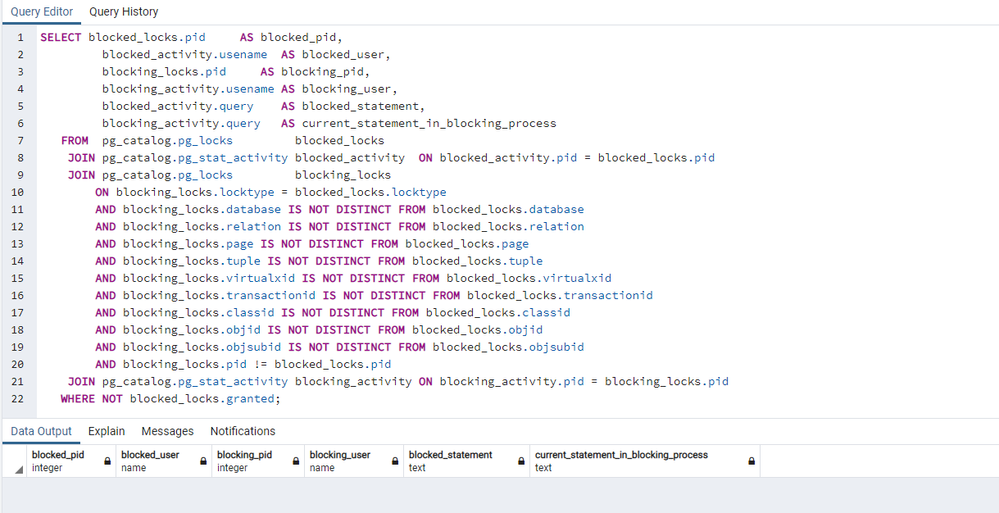
Locks when pgbench is executing
 

test2.png


We don´t observe any session being blocked during all the test execution.


In the test result, we see up to 523 Transactions Per Second (tps), a total of 10260 executions, so, in 20 seconds we correctly registered 10260 invoices, double number of invoices than old locking method.


So, even it seams a little complex, we can remove the locking problem when using user defined logic for monolithically increase identifiers by still using the sequential approach, with some code.

martes, 25 de agosto de 2020

Moving data with PostgreSQL COPY and \COPY commands

 When you want to move data into your PostgreSQL database, there are a few options available like pg_dump and Azure Data Factory. The method you pick depends on the scenario you want to enable. Today, we’re exploring three scenarios where you can consider using PostgreSQL’s COPY command.


“COPY is the Postgres method of data-loading. Postgres's COPY comes in two separate variants, COPY and \COPY: COPY is server based, \COPY is client based.” - The PostgreSQL Wiki


Both versions of COPY move data from a file to a Postgres table.


The server based COPY command has limited file access and user permissions, and isn’t available for use on Azure Database for PostgreSQL.


\COPY runs COPY internally, but with expanded permissions and file access. The source file does not have to exist on the same machine as the Postgres instance if you use \COPY. You can even use both absolute and relative paths.


\COPY is a psql feature. You need to have the psql application to be able to use \COPY.


Today, we’ll use \COPY to enable these three scenarios:


  • Migrating data from Postgres to Postgres
  • Ingesting from http data sources
  • Moving data from other database engines, like MySQL


Migrating data from Postgres to Postgres


For our first scenario, we’ll do a data migration between two PostgreSQL servers. We’ll first move the data with pg_dump, with and without parallelism. Then we’ll compare the performance using \COPY.


These are the advantages and disadvantages I expect to see:


Advantages

  • \COPY command goes through pipe, so no space required on client side
  • Potential for increased performance with parallelism, compared to pg_dump

Disadvantages

  • \COPY method does not migrate indexes, foreign keys, and other similar objects. You’ll have to take additional steps to move those objects.  Alternatively, you can consider using a migration service.


For this example, I will be migrating from an Azure Database for PostgreSQL Basic tier single Server to a General Purpose tier single server.


Prepare psql connection string scripts


First, I’ll store the psql connection strings to my source and destination servers in scripts. That way I can call those scripts when I want to connect.


pgsource.sh = bash script with psql and connection string to source `tests` database

pgdestination.sh = bash script with psql and connection string to destination `tests` database


cat <<EOF > pgsource.sh
PGPASSWORD=<sourcePassword> psql -t -h <sourceServerName>.postgres.database.azure.com -U <username>@<sourceServerName> tests
EOF
chmod +x pgsource.sh

cat <<EOF > pgdestination.sh
PGPASSWORD=<destinationPassword> psql -t -h <destinationServerName>.postgres.database.azure.com -U <username>@<destinationServerName> tests
EOF
chmod +x pgdestination.sh


My source database has 20 tables each with 1 million auto-generated rows. There are no indexes or foreign keys in this database.


Test full restoration with pg_dump/pg_restore (no parallelism)


Internally, pg_dump and pg_restore uses the COPY command


time PGPASSWORD=<sourcePassword> pg_dump -C -Fc -h <sourceServerName>.postgres.database.azure.com -U <username>@<sourceServerName> tests|PGPASSWORD=<destinationPassword> pg_restore -h <destinationServerName>.postgres.database.azure.com -U <username>@<destinationServerName> -C -c -d postgres

real    6m15.310s
user    0m22.976s
sys     0m9.393s


- Total Time: 6m15sec


Test full restoration with pg_dump/pg_restore (parallel)


We’ll need to use the directory format export, and dump to regular files. (See the pg_dump, pg_restore documentation to learn about format options).


time PGPASSWORD=<sourcePassword> pg_dump -C -Fd -h <sourceServerName>.postgres.database.azure.com -U <username>@<sourceServerName> tests -j 4 -f testsdir

real    3m23.004s
user    0m20.291s
sys     0m13.888s

time PGPASSWORD=<destinationPassword> pg_restore -h <destinationServerName>.postgres.database.azure.com -U <username>@<destinationServerName> -C -c -d postgres -j 4 testsdir

real    0m56.175s
user    0m1.671s
sys     0m0.478s


- Total Time: 4m19sec


Test data move with \COPY (no parallelism)


Let's use \COPY to move data. Here are the steps we’ll follow:

  • Preparation: use pg_dump and psql to move schema
  • Generate \COPY command pipes
  • Copy data through \COPY command pipes


time PGPASSWORD=<sourcePassword> pg_dump -C -Fc --schema-only -h <sourceServerName>.postgres.database.azure.com -U <username>@<sourceServerName> tests|PGPASSWORD=<destinationPassword> pg_restore -h <destinationServerName>.postgres.database.azure.com -U <username>@<destinationServerName> --schema-only -C -c -d postgres

real    0m15.288s
user    0m0.144s
sys     0m0.054s

time for j in `echo "SELECT table_name FROM information_schema.tables WHERE table_schema = 'public' and table_type='BASE TABLE' ORDER BY table_name"|./pgsource.sh`
do
       echo "\copy $j FROM PROGRAM 'echo copy binary $j to STDOUT|./pgsource.sh' WITH BINARY;"|./pgdestination.sh
done

real    7m47.179s
user    0m19.518s
sys     0m23.467s


- Total Time: 8m2sec


Test alternative restoration with \COPY (parallelism)


Unlike parallelized pg_dump / pg_restore, there's no need to move data to a staging file. We can continue to use the pipe mechanism from \COPY without parallelism.


export maxParal=4
>curParal.tmp
time for j in `echo "SELECT table_name FROM information_schema.tables WHERE table_schema = 'public' and table_type='BASE TABLE' ORDER BY table_name"|./pgsource.sh`
do
  echo $j >>curParal.tmp
  nohup $SHELL <<EOF &
  echo "\copy $j FROM PROGRAM 'echo copy binary $j to STDOUT|./pgsource.sh' WITH BINARY;"|./pgdestination.sh; sed -i '/^$j$/d' curParal.tmp
EOF
  while [ `wc -l curParal.tmp|cut -f 1 -d " "` -ge $maxParal ]
  do
    sleep 1 
  done 
  echo $curParal $maxParal
done

real    2m59.491s
user    0m24.388s
sys     0m40.200s


- Total Time: 3m14sec


\COPY's advantage over pg_dump


Without parallelism:

                pg_dump/pg_restore won with 6m15sec vs 8m2sec with \COPY approach


With parallelism:

                \COPY approach won with 3m14sec vs 4m19sec of pg_dump/pg_restore


Although pg_dump/pg_restore uses the COPY command internally, when we use a manual parallelism mechanism we can obtain better execution times. The performance improvement comes because with parallel \COPY we can use pipes and avoid saving data to a staging area, as pg_dump/pg_restore requires when using parallelism.


Using \COPY to ingest from http datasources


Using \COPY command we can ingest not only .csv, txt or binary files,  data or copy from another database through pipes, we can create authentic ETL-like processes with a single command.


In this case we are going to ingest the open csv dataset COVID-19 cases worldwide.


First, we’ll create a Postgres table called covid19casesww with the columns we need:


echo "create table covid19casesww (dateRep date,day integer,month integer,year integer,cases integer,deaths integer,countriesAndTerritories text,geoId text,countryterritoryCode text,popData2019 integer,continentExp text);"|PGPASSWORD=<destinationPassword> psql -t -h <destinationServerName>.postgres.database.azure.com -U <username>@<destinationServerName> tests


We ingest the data into our Postgres server with a pipe from wget to the \COPY command


echo "set datestyle to SQL,DMY;\COPY covid19casesww FROM PROGRAM 'wget -q -O - "$@" "https://opendata.ecdc.europa.eu/covid19/casedistribution/csv"|tail -n +2' CSV DELIMITER ',';"|PGPASSWORD=<destinationPassword> psql -t -h <destinationServerName>.postgres.database.azure.com -U <username>@<destinationServerName> tests


Now we can access the data and calculate, for example, the 10 territories with the lowest number of cases:


echo "select sum(cases) as cases, countriesAndTerritories, continentexp from covid19casesww group by countriesAndTerritories,continentExp order by 1 asc limit 10;"|PGPASSWORD=<destinationPassword> psql -h <destinationServerName>.postgres.database.azure.com -U <username>@<destinationServerName> tests

cases |      countriesandterritories      | continentexp
-------+-----------------------------------+--------------
     3 | Anguilla                          | America
     7 | Bonaire, Saint Eustatius and Saba | America
     8 | British_Virgin_Islands            | America
    11 | Montserrat                        | America
    11 | Papua_New_Guinea                  | Oceania
    11 | Seychelles                        | Africa
    12 | Holy_See                          | Europe
    13 | Falkland_Islands_(Malvinas)       | America
    13 | Greenland                         | America
    15 | Saint_Kitts_and_Nevis             | America
(10 rows)


Using \COPY to ingest from other database engines


Suppose we want migrate data from a MySQL server to a PostgreSQL server.


First create the destination table in Postgres. Mine is called prumysql.


echo "create table prumysql (a text, b integer);"|PGPASSWORD=<destinationPassword> psql -t -h <destinationServerName>.postgres.database.azure.com -U <username>@<destinationServerName> tests


Pipe from mysql to \COPY command


echo "\COPY prumysql FROM PROGRAM 'echo select a,b from prumysql|mysql -h <sourceServerName>.mysql.database.azure.com -u <username>@<sourceServerName> -p<sourcePassword> -sN --ssl tests -B' ;"|PGPASSWORD=<destinationPassword> psql -t -h <destinationServerName>.postgres.database.azure.com -U <username>@<destinationServerName> tests


/COPY as an alternative way to do PostgreSQL data migration


PostgreSQL’s \COPY enables a range of data loading experiences. We've shared some examples in this blog. How do you use \COPY?

viernes, 5 de julio de 2019

Analítica empresarial mediante la voz (Alexa/Cortana/Mobile)

Te interesa que tu equipo directivo y comercial dispongan de información al día de como crece la empresa, mediante dispositivo Alexa/Cortana, móvil o tablets, Sin necesidad de tener que exportar datos, todo desde una orden por voz. @Sepalo sigue creciendo. 


miércoles, 18 de abril de 2018

Script - Zabbix monitoring, automatic templates and hosts deployments

Here we have an script to populate a Zabbix 3.2 deployment with templates and hosts, previously exported (xml) from another Zabbix 3.2 installation.

apiUrl="http://<zabbix_server_ip>:<zabbix_server_port>/zabbix/api_jsonrpc.php"

## Getting Auth Token:
jsonAuthData='{"jsonrpc":"2.0","method":"user.login","params":{"user":"Admin","password":"<Admin_password>"},"auth":null,"id":0}'
authToken=$(curl -i -X POST -H 'Content-Type:application/json' -d $jsonAuthData $apiUrl 2>/dev/null | grep result | cut -d'"' -f 8)

# Import Templates
jsonTemplates='{"jsonrpc": "2.0",
"method": "configuration.import",
"params": {
    "format": "xml",
    "rules": {
        "groups": {
            "createMissing": true},
        "applications": {
            "createMissing": true,
            "updateExisting": true},
        "templates": {
            "createMissing": true,
            "updateExisting": true},
    "items": {
        "createMissing": true,
        "updateExisting": true,
        "deleteMissing": true}},
    "source": "'$(cat zbx_export_templates.xml|sed s#\"#\\\\\"#g)'"},"auth": "'${authToken}'","id": 1}'
echo $jsonTemplates|curl -i -X POST $apiUrl -H 'Content-Type:application/json' -d @-

# Import HOSTS
jsonHosts='{
"jsonrpc": "2.0",
"method": "configuration.import",
"params": {
    "format": "xml",
    "rules": {
        "templateLinkage": {
            "createMissing": true
        },
        "groups": {
            "createMissing": true
        },
        "hosts": {
            "createMissing": true,
            "updateExisting": true
        },
        "items": {
            "createMissing": true,
            "updateExisting": true,
            "deleteMissing": true
        }
    },
    "source": "'$(cat zbx_export_hosts.xml|sed s#\"#\\\\\"#g)'"},"auth": "'${authToken}'","id": 1}'
echo $jsonHosts|curl -i -X POST $apiUrl -H 'Content-Type:application/json' -d @-


Where, zbx_export_templates.xml and zbx_export_hosts.xml are files generated previously by hand (big effort) or by exporting the appropiate templates and hosts from an already configured Zabbix 3.2 environment:


This way we can automate the Zabbix monitoring environment provisioning without any post configuration manual steps.

Hope this can help you, please feel free to contact Sepalo Software if you want more information about infrastructure/monitoring automation.